Create a Zelo event page right now, name the animal-specific goal (something concrete like “Max’s Emergency Surgery”), set a fundraising number, add a cover photo, and share the link. Guests give faster when the ask is specific and the process feels safe.
That specificity is why it works: a named goal with a real photo and a clear number gives donors a reason to act instead of a vague request to skim past.
- Name the exact need: “Adoption Fee for Luna” beats “Help Our Pets”
- Set a realistic goal and timeline without specifying exact amounts
- Turn on secure checkout, the progress meter, and simple withdrawal options before you share
Zelo displays these trust signals automatically once your page is live, and you never need to register as a 501©(3) to collect a personal cash gift for a pet’s care.
Key Takeaways
A Zelo event page turns a specific, photo-backed animal need into a shareable fundraiser guests can support in minutes.
| Point | Details |
|---|---|
| Name the exact need | Titles like “Max’s Surgery Fund” convert better than a general animal-help request. |
| Break the goal into line items | List costs such as surgery or adoption fees so guests know what their gift covers. |
| Attach proof | A photo plus a vet estimate raises donor confidence and average gift size. |
| Share where guests already look | Put the link on your event site and RSVP emails rather than the printed invite. |
| Use Zelo for the whole process | Zelo handles secure checkout, goal tracking, and direct withdrawals for animal-related cash gifts. |
This article is general information, not a substitute for advice from a qualified financial advisor. Consult a qualified financial professional about your own circumstances before acting on anything here.
Table of Contents
- Setting Up a Zelo Page for Helping Animals
- How Do You Ask for Money to Help an Animal?
- What’s a Good Contribution Amount for an Animal Fundraiser?
- Where Should You Share Your Zelo Fundraising Link?
- What Happens After Gifts Start Coming In?
- What Does a Successful Animal Fundraiser Actually Look Like?
- Turn Your Milestone Into Real Help for an Animal in Need
- Sources
Setting Up a Zelo Page for Helping Animals
Building the page itself takes less time than writing the caption for your invitation. Follow this order and you will have something shareable inside half an hour.
- Sign in or create a Zelo account, choose your event type, and upload a photo. A close-up of the animal, not a stock image, performs better.
- Write a short title tied to the purpose. “Buddy’s Surgery Fund” works. “Help Us Help Animals” does not tell anyone what you need.
- Set your fundraising goal and deadline. Break the total into named line items guests can picture, such as surgery costs, medication, or adoption fees.
- Turn on PayPal checkout and confirm the bank or email account tied to your withdrawal. Zelo shows its platform fee upfront, so nobody wonders where a percentage of their gift went.
- Choose privacy settings. Decide between a public page or invite-only access, and switch on donor acknowledgment so contributors get a confirmation the moment they give.
- Turn on the progress meter so guests can see the goal filling up in real time. Momentum encourages more giving, not less.
Pro Tip: Photograph the vet estimate or adoption paperwork before you publish. A quick snapshot of the actual bill next to your page’s cover photo does more to build trust than any amount of writing, since redacted vet invoices tend to raise average gift size on rescue appeals.
How Do You Ask for Money to Help an Animal?
Open with the answer, not the backstory: who you’re helping, what the money covers, and how to give. Something like, “We’re raising $1,200 for Max’s emergency surgery. Every gift through this Zelo link goes straight to his vet bill.” Then add the story, because pairing a personal narrative with a specific dollar goal on a dedicated page increases donations more than a generic plea ever does.
State plainly what the funds cover in one sentence, whether that’s surgery, medication, or an adoption fee, then give the animal a name and a two- or three-sentence history. Guests give to Max, not to “our cause.”
Three templates make this easier:
- Short (social caption): “Max needs emergency surgery. Every dollar helps. Give here: [Zelo link].”
- Medium (invite insert): “Max was hit by a car three weeks ago. He’s healing, but his surgery bill is $1,200. If you’d like to help, our Zelo page has the details.”
- Long (page description): Open with the ask, add the story, list what specific amounts cover, and close with a thank-you line.
Skip clinical jargon, attach the vet estimate if you have one, and let guests choose a suggested tier or type their own amount.
What’s a Good Contribution Amount for an Animal Fundraiser?
Most guests want a number to anchor on rather than a blank box. Structuring tiers around real costs helps them decide fast:
Offer suggested contribution tiers tied to real costs, like a week of supplies, wound care, adoption fees, or a share of a major procedure, without listing exact amounts.
Recurring tiers built around specific dollar amounts, paired with transparency about what each one funds, tend to raise steadier totals than an open-ended ask. Group gifts work the same way: label a shared line item like “Recovery Fund — Group Gift” so three or four friends can split a $150 tier without anyone feeling pressured to cover it alone.
If you’re also sending printed invitations, keep the tiers off the card itself. Mention the Zelo page generally and let guests find the suggested amounts once they click through, and offer a small physical gift option for guests who prefer not to give cash.
Where Should You Share Your Zelo Fundraising Link?
The link only raises money if it reaches people who are already paying attention to your event. Prioritize channels where guests expect to find event details:
- Event website: Put the Zelo link in the top navigation, not buried in a paragraph. Etiquette guides generally recommend keeping the ask on the site instead of the printed invitation.
- RSVP emails: Add one sentence and the link when guests confirm attendance.
- Group chats and texts: A short, personal message to close friends and family converts better than a mass post.
- Social media: One clear caption with the link, not three posts in a row.
- QR code at the event: Print it on a small table sign so anyone can give on the spot.
Pro Tip: Share the link three times: once when invitations go out, once as a reminder a week before the event, and once after with a thank-you and outcome update. That third message is the one people remember.
What Happens After Gifts Start Coming In?
Managing the page after gifts arrive is mostly bookkeeping and gratitude. Handle it in this order:
- Check incoming gifts in your Zelo dashboard and watch the progress meter update automatically.
- Confirm your withdrawal details so funds move to your account without delay once you’re ready to collect.
- Update the goal page with a short note when you hit 50%, 100%, or close the fundraiser.
- Send a thank-you message to each donor, ideally within 24 hours, followed by a recap update with a photo once the vet bill is paid or the pet is adopted.
On fees: Zelo charges a transparent platform fee per contribution, and PayPal adds its own processing fee on top, both disclosed before a guest completes checkout. One thing worth knowing before you publish: personal cash gifts collected for an individual pet’s care are not automatically tax-deductible the way a donation to a registered 501©(3) charity would be. A guest giving toward Max’s surgery is making a personal gift to you, not a charitable contribution. Talk to a tax advisor if you’re unsure how a specific gift should be treated, and always follow Zelo’s terms along with any local rules on soliciting funds.
A simple thank-you template: “Thank you for helping Max heal. Because of gifts like yours, his surgery is fully funded, and he’s home recovering. Here’s a photo from this week.” That kind of specific, photo-backed update is exactly what keeps donors engaged through updates and images after the initial ask.
What Does a Successful Animal Fundraiser Actually Look Like?
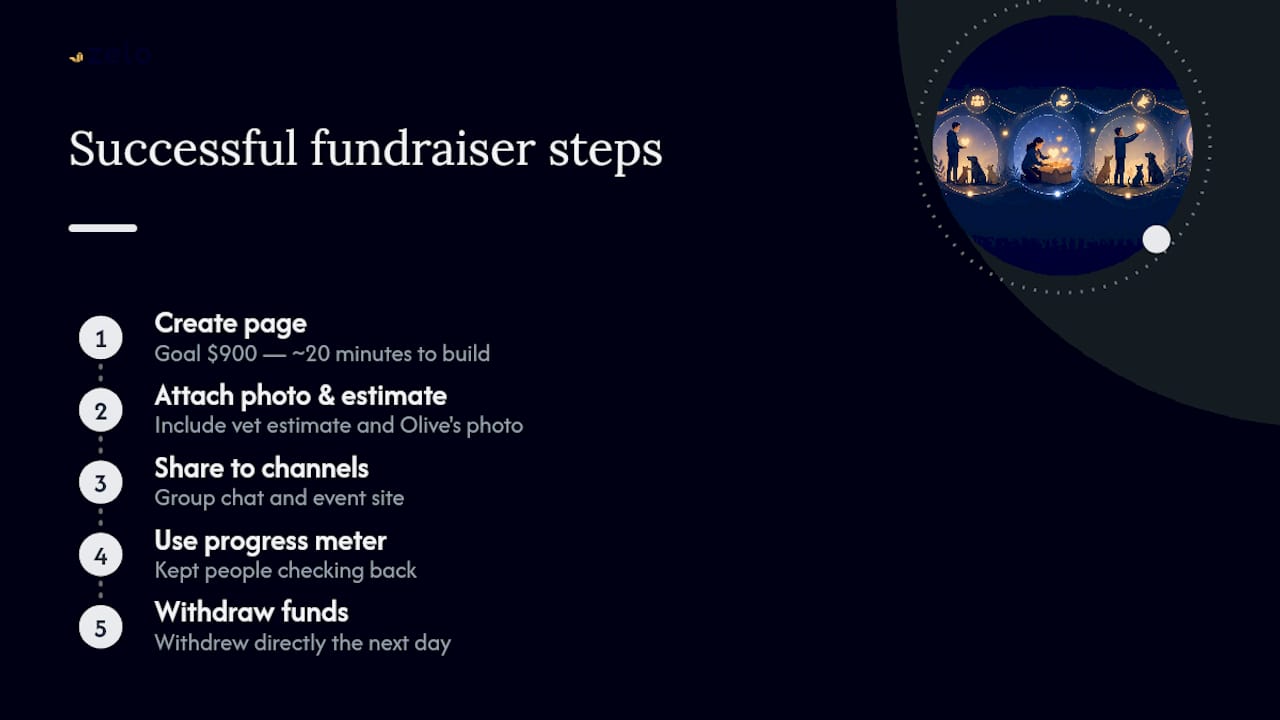
I set up a page for a friend’s cat, Olive, who needed a $900 dental surgery two weeks before her birthday party. I built the page in about 20 minutes, attached a photo of Olive and the vet estimate, and shared it in the group chat and on the event site. The progress meter kept people checking back, and I withdrew the funds directly the day after, no waiting on a third party to release anything.
Turn Your Milestone Into Real Help for an Animal in Need
Zelo is built for exactly this: a host who wants one clean page where guests can give toward a vet bill, adoption fee, or rescue-support goal without registry clutter or a mass of separate Venmo requests.

Three things make it work for animal-related asks specifically:
- Secure PayPal checkout so every guest gift is processed safely, with fees shown before anyone pays
- A visible goal progress meter that keeps momentum going as gifts arrive
- Direct withdrawals, no waiting for funds to clear through a third party once you’re ready to collect
Whatever the milestone tied to your ask, start a Zelo event page today, name the animal, set the goal, and get the link in front of the people who already want to help.
Sources
- Charitable Donations for Weddings and Special Occasions
- Celebrate love by giving back: requesting charity donations for your wedding | ShunBridal
- How to ask for money instead of gifts (wedding) | PartyPilot
- How to set up donations for animal shelters on WordPress
Recommended
Enjoyed the article? Share it!