The fastest, most accurate way to track cash gifts is to make your event page or registry tracker the live record, then export its CSV as your backup. Add a master spreadsheet that combines that export with manually logged entries for in-person cash, checks, and envelope gifts. Assign one trusted person to secure and log cash the moment it arrives, and follow standard thank-you timelines from there. This is host-facing tracking, not tax reporting, and it works whether you’re managing a wedding, a birthday, or a baby shower.
TL;DR:
- Export CSV files regularly from your event page or registry to ensure accurate, real-time tracking of contributions, including online and offline gifts.
- Assign one trusted person to manage in-person cash and envelope gifts, logging each gift immediately with a simple paper log for quick transfer into your master spreadsheet.
- Reconcile total contributions against bank deposits promptly, and mark each thank-you as sent with a date to prevent missing or duplicate acknowledgments within three months.
- Focus on the quality of the event-day handoff, ensuring cash and paper gifts are correctly logged and transferred, rather than overemphasizing spreadsheet design or thank-you wording.
- Use a dedicated folder to store all platform exports, and normalize contributor names to enable easy tracking and prevent duplicate thank-you notes across multiple registries.
Table of Contents
- Pre-Event Checklist: What To Prepare Before Guests Start Giving
- How Do You Set Up an Event Page That Tracks Gifts Cleanly?
- What’s the Best Way to Handle Cash Gifts at the Event Itself?
- How Do You Finalize Totals and Send Thank-You Notes on Time?
- Host-Tested Lessons on Tracking Cash Gifts
- Why Most Gift-Tracking Advice Misses the Real Problem
- A Simpler Way To Track Cash Gifts From the Start
- Sources
- FAQ
Pre-Event Checklist: What To Prepare Before Guests Start Giving
Good tracking starts before the first gift arrives. Spend an hour on setup and the rest of the event becomes far less stressful.
- Create your event page or cash fund, then test the checkout yourself so you know exactly what contributors see.
- Turn on email or text notifications so every contribution reaches you instantly instead of piling up unnoticed.
- Build a master spreadsheet with columns for guest name, contact info, mailing address, gift or contribution amount, source, date received, thank-you status, and notes.
- Pick who will secure and log in-person cash, and walk them through the handoff from paper log to digital spreadsheet.
- Decide on thank-you stationery or a mail-merge workflow now, before the backlog builds.
None of this takes long, but skipping it is how hosts end up guessing who gave what three weeks after the event.
How Do You Set Up an Event Page That Tracks Gifts Cleanly?
Your event page does most of the tracking work automatically, but only if you configure it correctly from the start.
- Name the fund clearly and add a short description. “Honeymoon Fund” tells guests less than “Help us get to Portugal this fall.” A specific description also nudges guests to leave the kind of notes you’ll want later for thank-you cards.
- Check your notification and visibility settings. Confirm whether contributor names and messages display for cash gifts, and whether notifications arrive by email or text. You want to know about every gift the moment it lands, not at the end of the week.
- Export your platform’s “Track Gifts” CSV regularly. Expect columns for purchaser or giver name, gift or fund designation, amount, date, and any note left at checkout. Registry platforms typically mark contributions as received automatically, but exporting weekly keeps a backup outside the platform itself, according to GiftList’s guidance on tracking registry gifts.
- Decide whether to show a public total. A visible progress bar toward a goal, like a down payment or a honeymoon, tends to boost guest engagement. The decision to make that number public should stay entirely with you as the host.
Pro Tip: Export your CSV before you make any changes to your event page’s settings or wording. A fresh export is the cheapest insurance against losing contributor notes if something glitches during an edit.
What’s the Best Way to Handle Cash Gifts at the Event Itself?
The event day is where tracking systems usually break, not the spreadsheet stage. Cash and envelopes move fast, and if nobody owns the process, gifts get set down, forgotten, or handed to the wrong person.
- Use a locked card or envelope box. This is non-negotiable for anything beyond a small gathering.
- Assign one person, ideally someone not in the wedding party or immediate hosting duties, to collect and log envelopes throughout the event.
- Give that person a simple paper log with columns for time, giver name or table number, amount if visible, a short note, and their own initials.
- Transfer every paper entry into the master spreadsheet the same day or the next morning, while memory and handwriting are both still fresh.
- Deposit checks promptly rather than letting them sit in a drawer for weeks.
- Follow up politely on anonymous gifts. A quick “I noticed a gift without a name attached, want to make sure I can thank you properly” usually gets a warm response.
Pro Tip: Brief your cash handler for five minutes before the event starts. A rushed handoff at the gift table is where names and amounts get lost, not later at home.
How Do You Finalize Totals and Send Thank-You Notes on Time?
Reconciliation is the step most hosts skip, and it’s the one that prevents awkward “did you get my gift?” conversations months later.
- Match your platform export totals against your actual bank deposits, and note any discrepancy immediately while it’s still traceable.
- Mark “thank-you sent” with a date on every guest row. Emily Post’s etiquette guidance recommends sending notes for pre-event gifts within two weeks, and getting everything out within three months of the event overall.
- Export a mail-merge file from your master sheet to batch your notes. Adding columns for Greeting Name, Addressee, Gift, and a short Anecdote lets a service like Grateful generate personalized cards at scale instead of you handwriting fifty notes from scratch.
- Archive the reconciled master sheet once every thank-you is sent. It becomes your permanent record if a question ever comes up later.
If you used The Knot or a similar registry alongside your cash fund, ShipNote’s walkthrough on pulling a Download List and feeding it into a mailing service is worth following step by step, especially for partner-retailer rows that drop the purchaser’s name.
Host-Tested Lessons on Tracking Cash Gifts
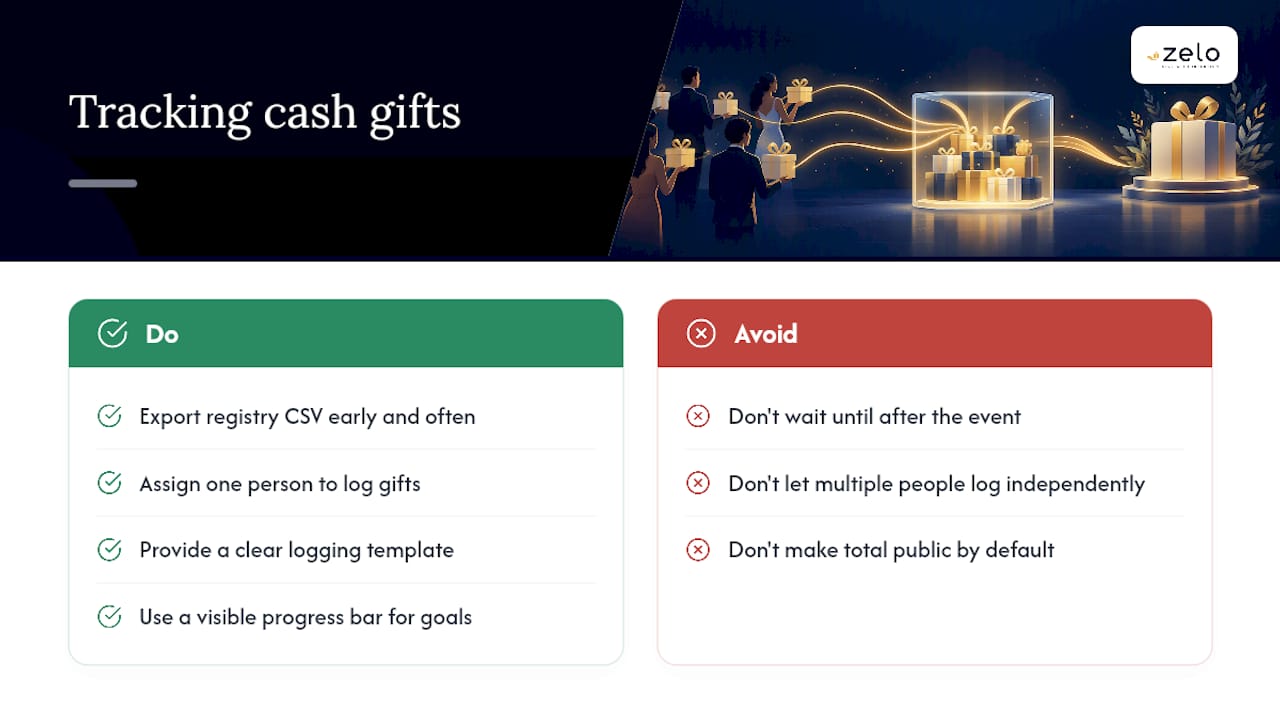
Export early and often. Hosts who wait until “after the event calms down” to pull their first CSV usually discover a contributor or two got missed somewhere along the way, and by then there’s no clean way to trace it back.
One-person logging beats three people trying to help. Multiple well-meaning family members logging envelopes independently almost always produces gaps, not redundancy. Brief one handler, hand them a clear template, and let everyone else enjoy the event.
Transparency helps, but only on your terms. A visible progress bar toward a honeymoon or down payment tends to encourage more giving, since guests like seeing their contribution move a real goal forward. Whether that total is public should always stay your call, not a default setting you forgot to check.
Why Most Gift-Tracking Advice Misses the Real Problem
Most advice on this topic focuses on spreadsheet templates, as if the hard part is designing columns. It isn’t. The hard part is the handoff, moving a name and an amount from a noisy event or a partner-retailer checkout into a single, trustworthy record without losing accuracy along the way.
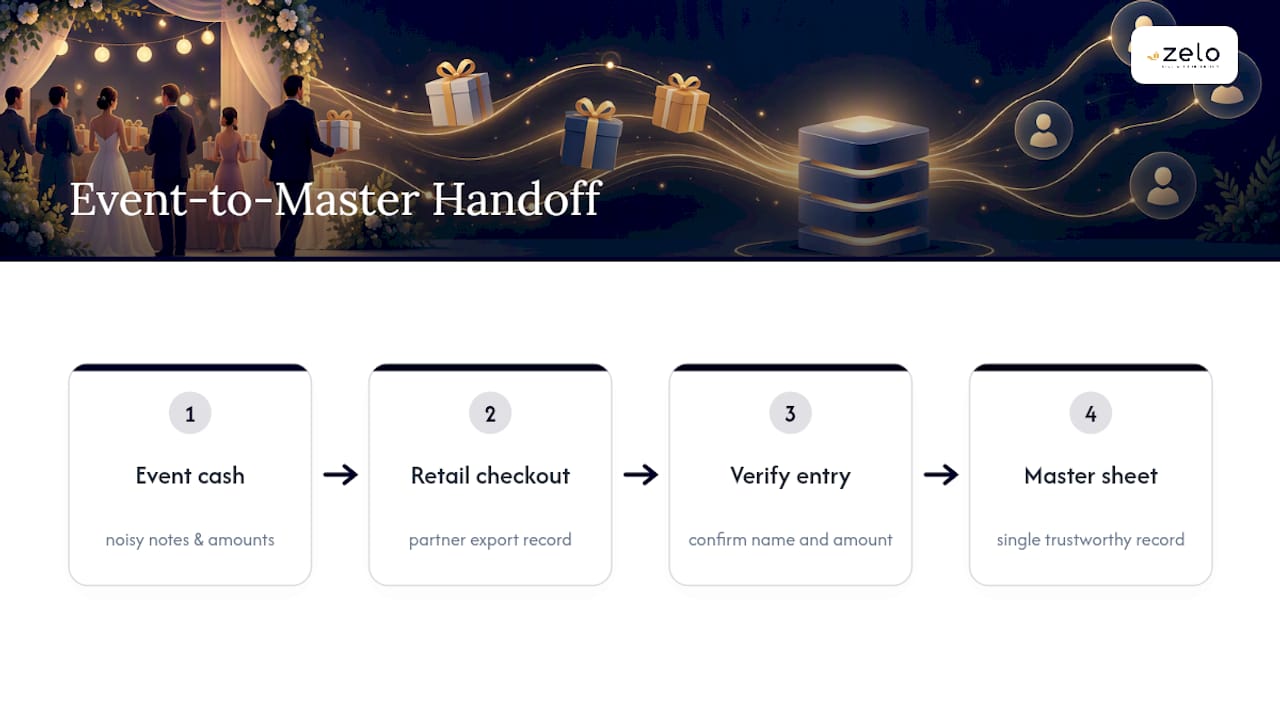
The conventional wisdom treats platform trackers and manual logs as competing systems. They aren’t. A platform export is your speed and structure; a master spreadsheet is your flexibility for cash, checks, and off-registry gifts. Hosts who pick one and ignore the other are the ones who end up guessing at totals in month two.
If you take one thing from this guide, prioritize the event-day handoff over the thank-you card design. A beautiful note sent to the wrong address, or with the wrong gift mentioned, does more damage to a relationship than a plain card that gets the facts right.
— Rodrigo
A Simpler Way To Track Cash Gifts From the Start
This platform offers an alternative to juggling spreadsheets and paper logs for hosts seeking tracking built in from day one. Every contribution made through your event page comes with a secure checkout, a recorded contributor name, and any note the guest leaves, so you’re not reconstructing details from memory after the fact.

The platform supports CSV export for your own records and offers direct withdrawals, meaning you’re not waiting on a third party to release funds before you can reconcile deposits against your master sheet. Whether you’re planning a wedding, a birthday, or an anniversary celebration, the same event page handles collection and record-keeping in one place. Getzelo charges a platform fee of 3.89% per contribution, with no setup or subscription cost. If you’re ready to see how it works for your own celebration, create your event page and start collecting with the tracking already handled.
Sources
Most hosts end up with gifts spread across a platform export, a paper log from the event, and maybe a second registry from a family member who set one up independently. Reconciling those into one file is where tracking either holds together or falls apart.
Start by saving every CSV export in a single folder, then import each one into your master spreadsheet with a dedicated “source” column. That way, if a number looks off later, you can trace it back to exactly where it came from.
- Emily Post — Wedding thank-yous
- Grateful — Turn invitation guest list into gift tracking spreadsheet
One detail worth building into your normalization rules early: use full legal names where you have them, and create a canonical “mailing name” field for envelope addressing. It sounds fussy until you’re staring at a spreadsheet three months later trying to remember whether “the Lopez family” got a thank-you note or not, per the normalization guidance ShipNote outlines.
FAQ
What’s the easiest way to track cash gifts for a wedding?
Use your event page or registry as the live record of every contribution, then export its CSV weekly into a master spreadsheet. Add manual rows for in-person cash and checks so your one spreadsheet covers everything, digital and physical.
How do I log cash gifts received in person at the event?
Assign one trusted person to manage a locked card box and keep a simple paper log with time, giver name, amount, and notes. Transfer those entries into your master spreadsheet the same day, while the details are still fresh.
When should I send thank-you notes for cash gifts?
Emily Post’s etiquette guidance recommends sending notes for pre-event gifts within two weeks of receipt, and getting all notes out within three months of the event. Marking each row “sent” with a date in your tracker keeps you from double-checking who’s already been thanked.
How do I combine gifts from multiple registries into one record?
Save each platform’s CSV export into one folder, then import them into a single master sheet with a source column. Normalize name variants like “Mike & Sarah” versus full legal names to avoid sending duplicate or mismatched thank-you notes.
Does Getzelo help with tracking and thank-you records?
Yes. Getzelo records each contributor’s name, amount, and note at checkout on your event page, and supports CSV export so you can build your master spreadsheet without re-entering data by hand.
Recommended
Enjoyed the article? Share it!